PPaT Wiki
လံာ်နဲၣ်ကျဲတဖၣ်Pathwayတၢ်သ့ၣ်ညါအဂံၢ်ခီၣ်ထံးတၢ်တဲသကိးအလီၢ်တၢ်ကွဲးဖုၣ်ဆဲးကျိး
Week streakFOUNDATION0 badges
ကျိာ်: Karen (S'gaw)
  • English
  • Nederlands
  • Karen (S'gaw)
  • Français
  • Deutsch
  • Lea faka-Tonga
  • Te reo Māori
သံကွၢ်ပှၤတဝၢ

Your PaT Pathway

0/46
Foundation
0/43
Practitioner
0/37
Advanced
0/20
Super User

Advanced

  • ●Form Test Mode (this page)
  • ○Pure Forms (not passed yet)
  • ○Conditional Formatting (not passed yet)
  • ○How to upload form elements to an SD (not passed yet)
  • ○Forms - Extract Data (the AI form builder) (not passed yet)
  • ○How to make form templates live for everyone to use (not passed yet)
  • ○Form builder: field types (not passed yet)
  • ○SD Forms (not passed yet)
  • ○Build a reporting system (not passed yet)
  • ○Endpoint Manager: finding endpoints and building your own UDF (not passed yet)
  • ○Configuring a UDF: columns and calculated columns (not passed yet)
  • ○Configuring a UDF: filters, grouping and endpoint details (not passed yet)
  • ○SD Dashboard: building a dashboard (not passed yet)
  • ○PaT SD Map Presentation (not passed yet)
  • ○PaT SD Map Overview (not passed yet)
  • ○Strategy System (not passed yet)
  • ○PaT SD Templates Overview (not passed yet)
  • ○How to use the PAR SD (not passed yet)
  • ○SD Security Settings (not passed yet)
  • ○SD Template Helper Functions (not passed yet)
  • ○Mastering the Business Strategy Template (not passed yet)
  • ○Using SDs as the LMS Document (not passed yet)
  • ○How to embed an SD into the LMS (not passed yet)
  • ○How to build modules in the Module publisher (not passed yet)
  • ○Module Publisher Content Options (not passed yet)
  • ○How to create module quizzes (not passed yet)
  • ○How to create module comprehension audits (not passed yet)
  • ○Module Completion Notification Setup (not passed yet)
  • ○Customer-specific training: setting it up (not passed yet)
  • ○How to create module evidential audits (not passed yet)
  • ○Module Admin: finding and managing modules (not passed yet)
  • ○Auto Escalation (not passed yet)
  • ○How managers can turn on OOF for their staff (not passed yet)
  • ○Using Chat to SD to go from being a good manager to a great one (not passed yet)
  • ○Throttling (not passed yet)
  • ○Live H&S Reporting (not passed yet)
  • ○Chat Management - Pro Tips (not passed yet)
  • Company Structure: adding a new user
  • Company Structure: customer companies
  • Company Structure: departments, job titles and roles
  • Company Structure: modules for a site or a country
  • Company Structure: process categories
  • Connections: linking PaT to Microsoft 365
  • Forms - API Integration
  • How to create a campaign for the PaT Lite training portal
  • How to edit an existing Bulletin Board Post
  • How to set up your SD Map
  • LMS Feedback: learner ratings and comments
  • LMS Metrics - If you can't measure it, you can't manage it
  • Manage users
  • Pacing recertifications and escalations
  • PaT Business Unit Template Overview
  • SD Workflows - Multi Submit
  • SD Workflows - Workflow Settings
  • System Activity: escalations, logins, emails and more
  • System Config: company settings
  • The org chart
  • Add any Image as a Section Header Icon
  • Assigning an SD to a new parent
  • C2E Attachments
  • Chat reminder
  • Chat to email to chat
  • Chat to SD
  • Chat to task to project
  • Comprehension Audits
  • Customer-specific training: how it works
  • Different Form Uses
  • Docked Chats
  • Docking SDs and Updating Images
  • Email to BFF
  • Email to chat to email – non PaT users
  • Embedding live data in an SD (graphs and spreadsheets)
  • Embedding SDs in SDs
  • Evidential audits: completing one
  • Filing and retrieving SDs
  • Form Wall
  • Health and safety templates
  • How PaT Manages Inactive Users
  • How SD chats work with SD Members and External Users
  • How to unlock a module for a staff member
  • Info Icons
  • Inline chats
  • Invite Attendees
  • LMS Architecture
  • Moving Section Headers
  • PaT AI
  • Pop-Out Chat Feature
  • Recurring tasks: create and edit
  • Running Meetings with SDs
  • Safe Walks
  • SD Element Categorisation
  • SD Form Responses: finding and exporting form responses
  • SD Owner Functions
  • SD Task wall view
  • Share and record your screen
  • Task Integrity: အဝဲမ့ၢ်မနုၤဒီး ဘၣ်မနုၤအဃိ အဝဲလီၤစှၤဝဲ
  • Track Engagement
  • Using SDs as a report or meeting minutes app
  • Video rooms: guests joining and asking to record
  • တၢ်မၤတၢ်တဖၣ် တပူၤဃီ
  • Activity Notifications
  • Add members and set permissions
  • AI Summary: a quick summary of an SD
  • Capture and Manage Accidents
  • Capture and Manage Hazards
  • Chat to task
  • Chat Wall
  • Contextual Communication
  • Convert a Note to a Task
  • Create a new SD
  • Critical Chrome Extensions
  • Document Store: shared links, your folders and favourites
  • Fast Notes
  • Getting help: the PaT Helpdesk
  • Global Search
  • Group Chats
  • How to embed Outlook onto your PaT
  • How to resize your browser to best view PaT
  • How to use the PaT Lite training portal
  • Insert links
  • Module Learning - Desktop
  • Module Learning - Mobile
  • My Profile
  • Newbie PaT Intro – Chats and SDs
  • Notes
  • Out Of Office: turning it on, and the calendar on your Task Wall
  • Outlook 2FA Issue
  • PaT Mobile App – Overview
  • PaT တၢ်ကတိၤသကိး အဂ့ၢ်တၢ်ကွၢ်ထံ
  • Preview, download and share files
  • Publish a Bulletin Board Post
  • Reading an SD in another language
  • SD Elements
  • SD Main page useful features
  • SD Overview
  • Section Headers
  • Security measures for multiple users on a device
  • Share Feedback
  • Signing in to PaT and resetting your password
  • Traffic light progress
  • Upload file attachments
  • Video calls on the mobile app
  • တၢ်တိာ်ကျဲၤတမံၤအဂီၢ် တၢ်မၤတမံၤတ့ၢ်
  • တၢ်မၤအတၢ်ရဲၣ်တၢ်ကျဲၤကျိၤကျဲ
  • တၢ်မၤအဒူၣ်
  • တၢ်ရဲၣ်ကျဲၤ တၢ်မၤ
  • Build a reporting system
  • Chat Management - Pro Tips
  • Conditional Formatting
  • Configuring a UDF: columns and calculated columns
  • Configuring a UDF: filters, grouping and endpoint details
  • Customer-specific training: setting it up
  • Endpoint Manager: finding endpoints and building your own UDF
  • Form builder: field types
  • Form Test Mode
  • Forms - Extract Data (the AI form builder)
  • How to build modules in the Module publisher
  • How to create module comprehension audits
  • How to create module evidential audits
  • How to create module quizzes
  • How to embed an SD into the LMS
  • How to make form templates live for everyone to use
  • How to upload form elements to an SD
  • How to use the PAR SD
  • Live H&S Reporting
  • Mastering the Business Strategy Template
  • Module Admin: finding and managing modules
  • Module Completion Notification Setup
  • Module Publisher Content Options
  • PaT SD Map Overview
  • PaT SD Map Presentation
  • PaT SD Templates Overview
  • Pure Forms
  • SD Dashboard: building a dashboard
  • SD Forms
  • SD Security Settings
  • SD Template Helper Functions
  • Strategy System
  • Throttling
  • Using Chat to SD to go from being a good manager to a great one
  • Using SDs as the LMS Document
  • တၢ်ဆီၣ်ထွဲထီၣ် အလီၢ်လီၢ်
  • မ့ၢ်မန်နေဂျၢ်တဖၣ် ကဒုးအိၣ်ထီၣ် OOF လၢအဝဲသ့ၣ်အပှၤမၤတၢ်ဖိတဖၣ်အဂီၢ်
  • PaT Lite: PaT အဂ့ၢ်အခိၣ်တဖၣ် လၢနကဘၣ်နၢ်ပၢၢ်
  • PaT မ့ၢ်မနုၤလဲၣ် ဒီးဘၣ်မနုၤအဃိ အရ့ဒိၣ်လဲၣ်
  • PaT Lite: တဲၤသကိးတၢ်ဆူ မူဒါ
  • PaT Lite: Strategy Documents အဂ့ၢ်တဲဖျါထီၣ်
  • PaT Lite: အခရာကျတၢ်ဆိကမိၣ် — တၢ်ဘျၢဒီးတၢ်မၤထွဲတၢ်ကူၣ်ထွာ်
  • PaT Lite: နီၢ်ကတဲာ်ကတီၤတၢ်ဒီးဆိကမိၣ်တၢ်ဃုာ်ဒီးနၤအပီးအလီတဖၣ်
  • PaT Lite: စီးပွားရေးအနာဂတ်န့ၣ် မ့ၢ်တၢ်ဆဲးတၢ်လၤ
  • PaT wiki အဂ့ၤအူၣ်ဆူၣ်
  • နတၢ်မၤအလီၢ်အကျဲ
  • နံၣ်ဆိကတၢၢ်တနွံ
  • Strategy Documents
  • တၢ်မၤတဖၣ်ဒီး တၢ်ဟ့ၣ်မူဒါတဖၣ်
  • တၢ်ပျဲတၢ်မၤအကျိၤအကျဲ
  • တၢ်ကတိၤသကိးဒီး တၢ်တဲသကိး
  • တၢ်ကွဲးလီၤတၢ်ကစီၣ်ဒီး တၢ်ဆှၢထီၣ်တဖၣ်
  • တၢ်ထံၣ်ကွၢ်တၢ်အိၣ်အသး ဒီးတၢ်တဲဖျါထီၣ်တၢ်ဂ့ၢ်
  • တၢ်ရဲၣ်ကျဲၤပှၤသူတၢ်ဖိတဖၣ်
  • Workspace အတီၤအကျဲတဖၣ်
  • ဆက်စပ်တၢ်စံၣ်စိၤတဲစိၤတၢ်ဂီၤမူစံၣ်စိၤတဲစိၤကျိၣ်စ့တၢ်ရဲၣ်တၢ်ကျဲၤစနစ်
  • တၢ်နုာ်လီၤတဘျီဃီ
  • API အဂ့ၢ်အကျိၤ
  • Token တဖၣ် အတၢ်နုာ်လီၤခွဲး
  • Webhooks
0/46
Foundation
0/43
Practitioner
0/37
Advanced
0/20
Super User
Advanced quizzes: 0 of 37 passed
  • ●Form Test Mode (this page)
  • ○Pure Forms (not passed yet)
  • ○Conditional Formatting (not passed yet)
  • ○How to upload form elements to an SD (not passed yet)
  • ○Forms - Extract Data (the AI form builder) (not passed yet)
  • ○How to make form templates live for everyone to use (not passed yet)
  • ○Form builder: field types (not passed yet)
  • ○SD Forms (not passed yet)
  • ○Build a reporting system (not passed yet)
  • ○Endpoint Manager: finding endpoints and building your own UDF (not passed yet)
  • ○Configuring a UDF: columns and calculated columns (not passed yet)
  • ○Configuring a UDF: filters, grouping and endpoint details (not passed yet)
  • ○SD Dashboard: building a dashboard (not passed yet)
  • ○PaT SD Map Presentation (not passed yet)
  • ○PaT SD Map Overview (not passed yet)
  • ○Strategy System (not passed yet)
  • ○PaT SD Templates Overview (not passed yet)
  • ○How to use the PAR SD (not passed yet)
  • ○SD Security Settings (not passed yet)
  • ○SD Template Helper Functions (not passed yet)
  • ○Mastering the Business Strategy Template (not passed yet)
  • ○Using SDs as the LMS Document (not passed yet)
  • ○How to embed an SD into the LMS (not passed yet)
  • ○How to build modules in the Module publisher (not passed yet)
  • ○Module Publisher Content Options (not passed yet)
  • ○How to create module quizzes (not passed yet)
  • ○How to create module comprehension audits (not passed yet)
  • ○Module Completion Notification Setup (not passed yet)
  • ○Customer-specific training: setting it up (not passed yet)
  • ○How to create module evidential audits (not passed yet)
  • ○Module Admin: finding and managing modules (not passed yet)
  • ○Auto Escalation (not passed yet)
  • ○How managers can turn on OOF for their staff (not passed yet)
  • ○Using Chat to SD to go from being a good manager to a great one (not passed yet)
  • ○Throttling (not passed yet)
  • ○Live H&S Reporting (not passed yet)
  • ○Chat Management - Pro Tips (not passed yet)
  1. တၢ်နဲၣ်ကျဲ
  2. Advanced
  3. Form Test Mode

စဲးကျိာ်ထံလံာ်ကဘျံးအံၤဒီး ဘၣ်သ့ၣ်သ့ၣ် ကအိၣ်ဒီးတၢ်ကမၣ်တဖၣ်လီၤ။ ဖးအဲကလံးကျိာ်တၢ်ဂ့ၢ်မိၢ်ပှၢ်။

Form Test Mode

တုၤခဲအံၤ, တၢ်မၤကွၢ်ဖီၣ်မၤတၢ်တခုအံၤ အခီပညီမ့ၢ်ဝဲ နတၢ်မၤကွၢ်တၢ်တဖၣ် ဘၣ်တၢ်ပာ်ဝဲလၢ တၢ်လီၢ်တမံၤဃီဒီး တၢ်မၤတၢ်နီၢ်နီၢ်တဖၣ်လီၤ. နတမၤကွၢ်ဖီၣ်မၤတၢ်လၢ ၦၤသူအီၤတကွီၢ်လၢၤဘၣ်, မ့တမ့ၢ် နမၤအီၤဝံၤဒီး ဟးဃုကွၢ်…

လၢလံာ်ကဘျံးအံၤ
  • တၢ်အံၤဘၣ်တၢ်သူအီၤလၢ တၢ်မနုၤအဂီၢ်လဲၣ်
  • ကစးထီၣ်သူအီၤ
  • ၦၤလၢအမၤပှဲၤဖီၣ်မၤတၢ်တခါအံၤ ထံၣ်ဘၣ်တၢ်မနုၤလဲၣ်
  • ဒေတာမၤအသးဒ်လဲၣ်
  • တၢ်မၤကွၢ်အဒေတာ သုးဘၣ်ဆူလဲၣ်, ဒီးတသုးဘၣ်ဆူလဲၣ်
  • ကွၢ်ဘၣ်နတၢ်မၤကွၢ်အဒေတာ
  • မတၤတဖၣ်ကွၢ်ဘၣ်တၢ်မၤကွၢ်အဒေတာသ့
  • က့ၤဆူတၢ်မၤနီၢ်နီၢ်
  • တၢ်ဆီၣ်သနံးတဖၣ်လၢကြၢးသ့ၣ်ညါ

တၢ်အံၤဘၣ်တၢ်သူအီၤလၢ တၢ်မနုၤအဂီၢ်လဲၣ်

တုၤခဲအံၤ, တၢ်မၤကွၢ်ဖီၣ်မၤတၢ်တခုအံၤ အခီပညီမ့ၢ်ဝဲ နတၢ်မၤကွၢ်တၢ်တဖၣ် ဘၣ်တၢ်ပာ်ဝဲလၢ တၢ်လီၢ်တမံၤဃီဒီး တၢ်မၤတၢ်နီၢ်နီၢ်တဖၣ်လီၤ. နတမၤကွၢ်ဖီၣ်မၤတၢ်လၢ ၦၤသူအီၤတကွီၢ်လၢၤဘၣ်, မ့တမ့ၢ် နမၤအီၤဝံၤဒီး ဟးဃုကွၢ်တၢ်တိၢ်တဖၣ်လၢ ကဘၣ်ထုးကွံာ်အီၤလၢခံလီၤ။

Test Mode မၤစၢၤနၤလၢ နကပာ်ဖီၣ်မၤတၢ်တခုအံၤလၢ တၢ်မၤကွၢ်အပူၤ, မၤအီၤအါဘျီဒ်နအဲၣ်ဒိးအသိး, ကွၢ်သမံသမိးလၢ တၢ်ကဲထီၣ်အီၤဘၣ်ဃးမ့ၢ်ဝဲ, ဒီးသ့ၣ်ညါလၢ တၢ်တမံၤလၢ်လၢ်တလဲၤတုၤလၢ dashboard တၢ်ဖျါထီၣ်တဖၣ်လၢ အသူဝဲတကွီၢ်နီၢ်နီၢ်ဘၣ်. နမၤဝံၤအခါ, ဆီတလဲက့ၤအီၤလီၤ။

ကစးထီၣ်သူအီၤ

အိးထီၣ်ဖီၣ်မၤတၢ်အံၤလၢ form builder အပူၤ, အိးထီၣ် Settings အက့ၢ်အဂီၤ, ဒီးဃု Testing Mode (တၢ်ဆှၢထီၣ်တဖၣ် ဘၣ်တၢ်ပာ်အီၤဒ် တၢ်မၤကွၢ်တၢ်အသိး) လီၤ. ပာ်အီၤလၢ YES တက့ၢ်။
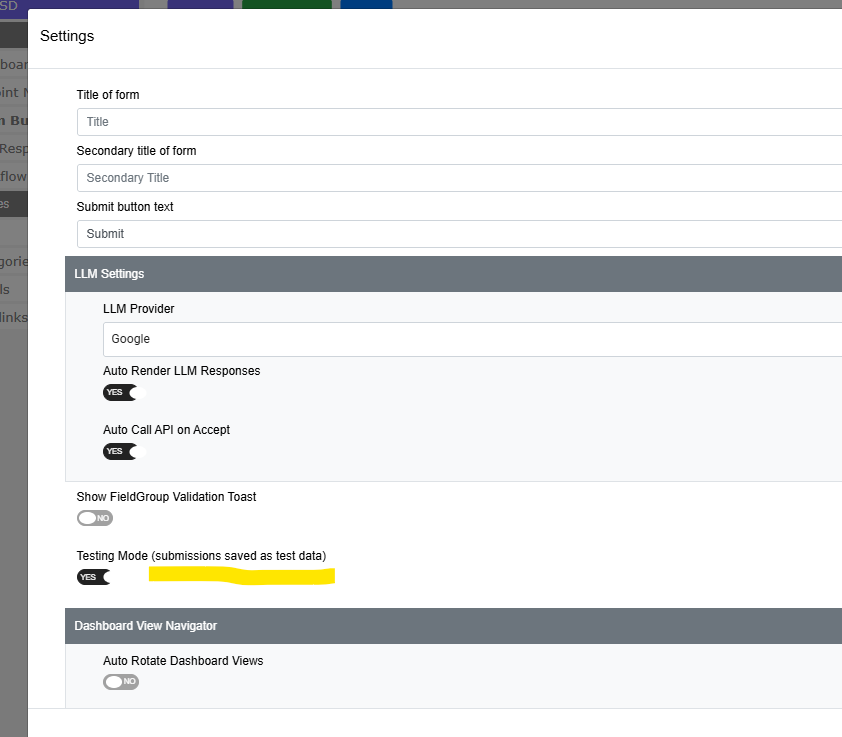
တၢ်သိၣ်လိအဂီၢ် တၢ်ဂီၤ

နကထံၣ်ဘၣ်အီၤလၢ Settings စရီအကတၢၢ်တဝာ်, လၢ Show FieldGroup Validation Toast အဖီလာ်တဘျီဃီ ဒီး Dashboard View Navigator အက့ၢ်အဂီၤအဖီခိၣ်တကပၤလီၤ။

Settings ခလုတ်အံၤ ကအိၣ်ဒံးဒီးအရ့ၣ်တုၤ form အံၤအိၣ်ဒီး field အနီၢ်ဂံၢ် အစှၤကတၢၢ်တခါလီၤ. နမ့ၢ်ကနှိး Settings တသ့ဘၣ်န့ၣ်, အဆိကတၢၢ် ထၢနုာ် field တခါလၢ form အပူၤတက့ၢ်။

ခလုတ်အံၤ ပာ်ဖျါထီၣ်ဝဲလၢ forms မျးနှာဖျါတဖၣ်အပူၤန့ၣ်လီၤ. ပာ်ခူသူၣ်အီၤလၢ dashboard builder အပူၤ တမ့ၢ်တၢ်လီၤတံၢ်ဘၣ်, အဂ့ၢ်ဒ်လဲၣ် dashboard တခါအံၤ တအိၣ်ဒီးတၢ်လၢကပာ်အီၤလၢ test mode အပူၤဘၣ်။

ၦၤလၢအမၤပှဲၤဖီၣ်မၤတၢ်တခါအံၤ ထံၣ်ဘၣ်တၢ်မနုၤလဲၣ်

တၢ်ဂီၤဝါတၢ်ဘိးဘၣ်သ့ၣ်ညါတခု လၢ form အခိၣ်ထိးဒီတကတၢၢ်: TESTING MODE - တၢ်စံးဆၢတဖၣ်လၢ ဘၣ်တၢ်ဆှၢထီၣ်ခီဖျိ form အံၤန့ၣ် ဘၣ်တၢ်ပာ်အီၤဒ် တၢ်မၤကွၢ်တၢ်အသိး ဒီးတဖျါထီၣ်လၢ dashboard တဖၣ်လၢ အသူဝဲတကွီၢ်နီၢ်နီၢ်ဘၣ်။
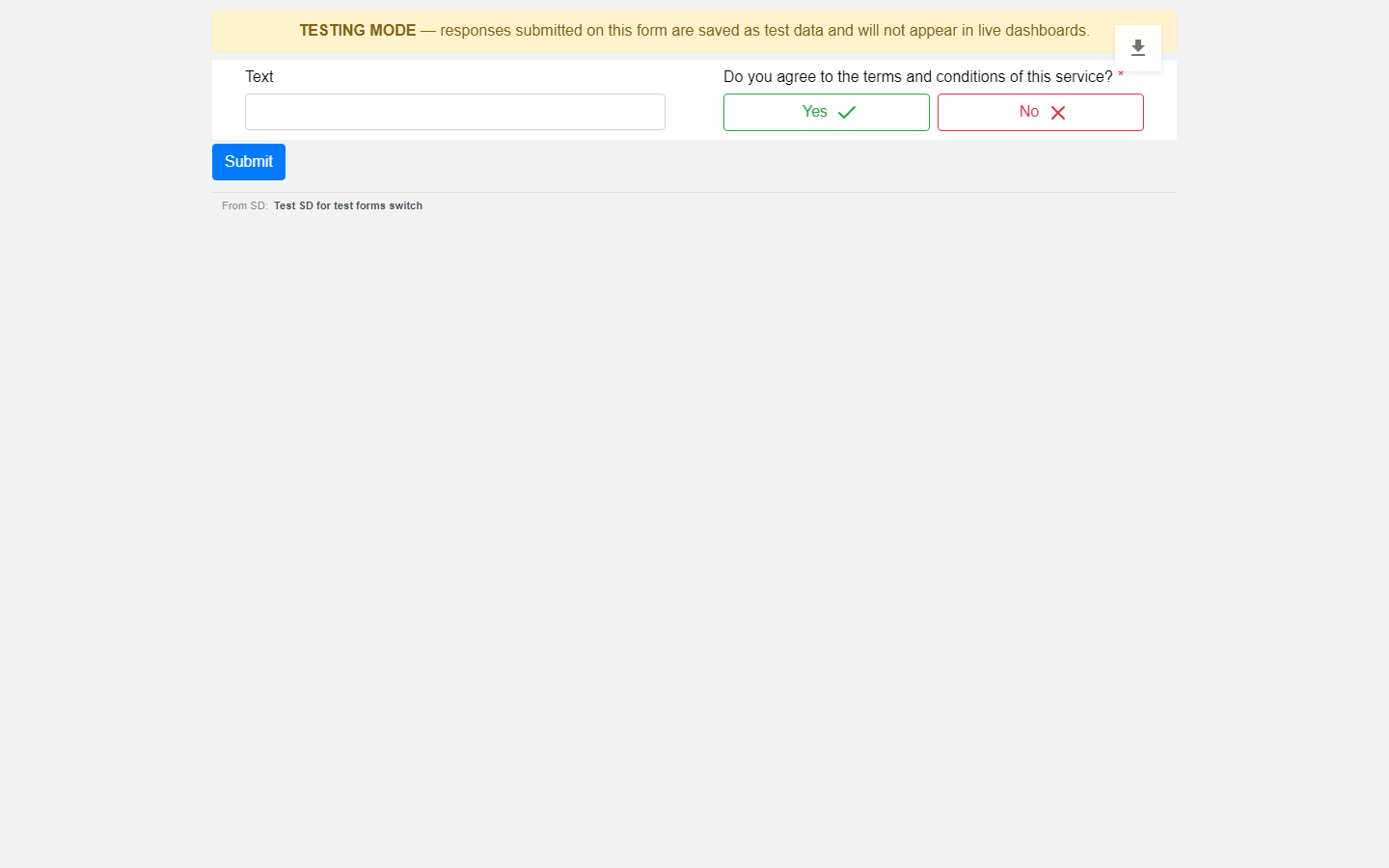
တၢ်သိၣ်လိအဂီၢ် တၢ်ဂီၤ

တၢ်အံၤဘၣ်တၢ်မၤအီၤလၢ ကထံၣ်တတုၤဘၣ်အဂီၢ်န့ၣ်လီၤ. ၦၤတဂၤဂၤ တဘၣ်မၤပှဲၤ form တခါလၢ အဆိကမိၣ်ဝဲလၢ အတၢ်စံးဆၢန့ၣ် တၢ်ပာ်အီၤလၢတၢ်ဂံၢ်အပူၤ, ဖဲတၢ်တပာ်အီၤလၢတၢ်ဂံၢ်အပူၤဘၣ်န့ၣ်လီၤ. ပာ်ဆီတလဲက့ၤ form အံၤဆူ Live အခါ, တၢ်ဘိးဘၣ်သ့ၣ်ညါအံၤ တအိၣ်လၢၤဘၣ်။

ဒေတာမၤအသးဒ်လဲၣ်

တၢ်ဆှၢထီၣ်တခါစုာ်စုာ်န့ၣ် ဖဲအဆှၢထီၣ်အခါ တၢ်ပာ်စၢၤအီၤလၢ တၢ်မၤကွၢ် မ့တမ့ၢ် တၢ်မၤနီၢ်နီၢ်လီၤ. တၢ်ပာ်စၢၤအီၤဒ်လဲၣ်န့ၣ် တၢ်ဖးကွၢ်လံာ်တၢ်မၤပှဲၤအတၢ်ဂ့ၢ်တၢ်ကျိၤလၢ server အပူၤ, တမ့ၢ်တၢ်လၢ browser ဆှၢပှၤန့ၣ်ဘၣ်—အဃိ ပှၤမၤအီၤကဘျံးတသ့ဘၣ်, ဒီးပှၤလၢမၤပှဲၤလံာ်တဂၤစ့ၢ်ကီး ဆီတလဲအီၤတသ့ဘၣ်.

တၢ်မၤကွၢ်အတၢ်စံးဆၢတဖၣ် တၢ်ပာ်ကီၤဃာ်အီၤ, တမ့ၢ်တၢ်တ့ၢ်ကွံာ်အီၤဘၣ်. လၢခံ နကွၢ်က့ၤအီၤသ့ဒံးလီၤ.

တၢ်မၤကွၢ်အဒေတာ သုးဘၣ်ဆူလဲၣ်, ဒီးတသုးဘၣ်ဆူလဲၣ်

လၢတၢ်စးထီၣ်အခါ dashboard ပာ်ဖျါထဲ တၢ်မၤနီၢ်နီၢ်အတၢ်စံးဆၢတဖၣ်လီၤ. တၢ်အံၤပၣ်ဃုာ်ဒီး နီၣ်ဂံၢ်တဖၣ် ဒီးတၢ်ကွဲးနီၣ်တဖၣ်စ့ၢ်ကီး—နီၣ်ဂံၢ်ခဲလၢာ်, တၢ်ကွဲးနီၣ်အနီၣ်ဂံၢ် ဒီးတၢ်လဲၤကွၢ်လံာ်ကဘျံးတဖၣ် တပာ်ဃုာ် တၢ်မၤကွၢ်အတၢ်စံးဆၢဘၣ်. တၢ်မၤကွၢ်တခါန့ၣ် မၤအါထီၣ်နီၣ်ဂံၢ် မ့တမ့ၢ် ဇယားတၢ်ဂီၤတခါလၢတၢ်တသ့ၣ်ညါအီၤဘၣ်န့ၣ် တသ့ဘၣ်.
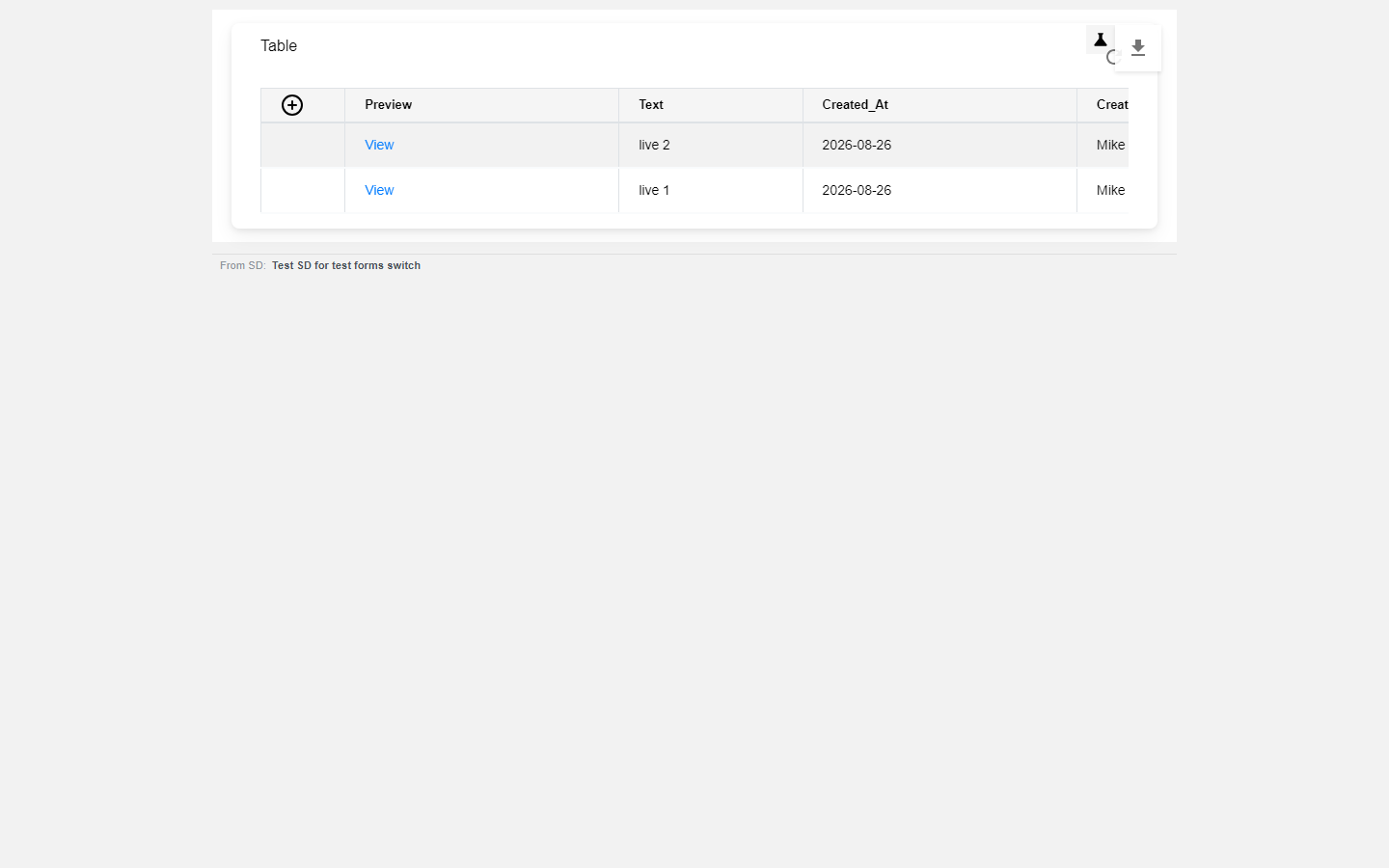
တၢ်သိၣ်လိအဂီၢ် တၢ်ဂီၤဖျါ

ကွၢ်ဘၣ်နတၢ်မၤကွၢ်အဒေတာ

ကွဲးထံၣ် ဖၣ်လၣ်အတၢ်အၢၣ်လၢ dashboard အထးကံၢ်ထံးထီဘိန့ၣ်တက့ၢ်. အခီၣ်ထံးဆီတလဲဆူ တၢ်ပာ်ဖျါထဲ test စံးဆၢတဖၣ်အိၣ်ဝဲ, ဒီး orange TEST DATA VIEW တၢ်ပနီၣ်လၢ ကသ့ၣ်နီၣ်ထီၣ်ဘၣ်နၤလၢ နအိၣ်လၢ တၢ်ပာ်ဖျါအံၤအပူၤန့ၣ်လီၤ. ကွဲးထံၣ်အီၤကဒီးတဘျီ ဒ်သိးကက့ၤဆူ live တက့ၢ်.
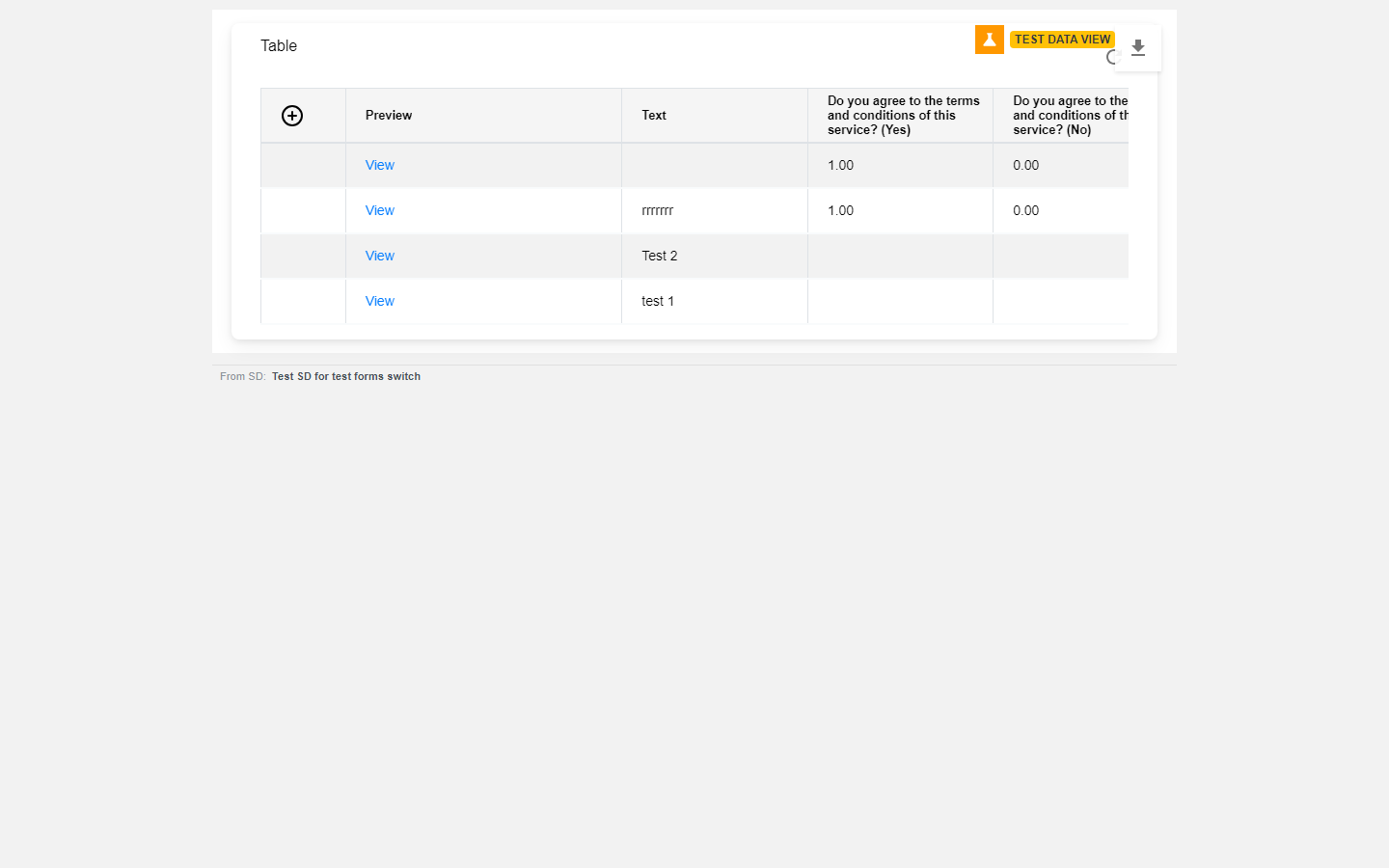
တၢ်သိၣ်လိအဂီၢ် တၢ်ဂီၤဖျါ

အဝဲဘၣ်ထွဲဒီးပှၤတဂၤစုာ်စုာ်လီၤ—နမၤအီၤန့ၣ် ဆီတလဲထဲတၢ်လၢနထံၣ်အီၤ, တဆီတလဲတၢ်လၢပှၤဂၤထံၣ်အီၤဘၣ်. ဒီးအဝဲဘၣ်ထွဲဒီး dashboard တခါစုာ်စုာ်စ့ၢ်ကီးလီၤ—မၤအီၤလၢ dashboard တခါအဂီၢ်န့ၣ် တမၤဆီတလဲ dashboard အဂၤခဲလၢာ်ဆူ တၢ်မၤကွၢ်အက့ၢ်အဂီၤဘၣ်.

မတၤတဖၣ်ကွၢ်ဘၣ်တၢ်မၤကွၢ်အဒေတာသ့

ထဲပှၤလၢအမ့ၢ် SD အကရၢဖိတဖၣ်လၢ dashboard အံၤဘၣ်ထွဲဒီးအီၤန့ၣ်လီၤ. ပှၤလၢအနုာ်လီၤကွၢ် dashboard ခီဖျိ တၢ်န့ၢ်လီၤပာ်ဖှိၣ်အခီၣ်ထံးတၢ်ဆဲးကျိးန့ၣ် ထံၣ်ထဲတၢ်မၤနီၢ်နီၢ်အဒေတာထီဘိ, ဒီးတထံၣ်ဘၣ် တၢ်ဖံးတၢ်မၤအတၢ်ဂီၤနီတဘျီဘၣ်.

က့ၤဆူတၢ်မၤနီၢ်နီၢ်

ပာ်လီၤကွံာ် Testing Mode အတၢ်ဆီတလဲ. စးထီၣ်ဖဲန့ၣ်န့ၣ်, တၢ်ဆှၢထီၣ်အသီတဖၣ် တၢ်ကပာ်စၢၤအီၤလၢ တၢ်မၤနီၢ်နီၢ်လီၤ. တၢ်မၤကွၢ်အတၢ်စံးဆၢလၢအအိၣ်ပာ်စၢၤတဖၣ် ကအိၣ်ဒ်တၢ်မၤကွၢ်အသိးဒံးလီၤ—တဆီတလဲအီၤဘၣ်. အဃိ နမ့ၢ်အဲၣ်ဒိးမၤလီၤမၢ်အီၤန့ၣ်, နကဘၣ်ထုးကွံာ်အီၤလီၤ. တလိၣ်အိၣ်ခိးဘၣ်; dashboard မ့ၢ်ထုးန့ၢ်ဒေတာလၢခံတဘျီန့ၣ်, အဝဲကပာ်ဖျါတၢ်ဆီတလဲအံၤလီၤ.

တၢ်ဆီၣ်သနံးတဖၣ်လၢကြၢးသ့ၣ်ညါ

တၢ်မၤပှဲၤတၢ်မၤကွၢ်တဖၣ်စ့ၢ်ကီးတၢ်မၤတၢ်ဖံးတၢ်မၤအနီၢ်ကီၢ်လီၤ. တၢ်ထုးကွံာ်တၢ်စံးဆၢတဖၣ်အံၤ ဘၣ်ဃးဒီး form-response dashboard တဖၣ်လီၤ. နမ့ၢ်အိၣ်ဒီး widget လၢအဂံၢ် SDs မ့တမ့ၢ် ticket လၢတၢ်တ့ထီၣ်အီၤတဖၣ်န့ၣ်, တၢ်မၤပှဲၤတၢ်မၤကွၢ်တဖၣ် ကဘၣ်တၢ်ဂံၢ်ဃုာ်အီၤဖဲန့ၣ်စ့ၢ်ကီးလီၤ. အဝဲအံၤ မ့ၢ်တၢ်ဆၢတဲာ်လၢအပာ်ပနီၣ်တၢ်အဘျဲးအလဲ တမ့ၢ်တၢ်သးပ့ၤနီၣ်ဘၣ်.

တၢ်ဆှၢထီၣ်တမံၤလၢ်လၢ် တချုးလၢတၢ်ဂ့ၢ်အံၤအိၣ်ထီၣ်န့ၣ် ဘၣ်တၢ်ပာ်အီၤလၢတၢ်အနီၢ်ကီၢ်လီၤ. တၢ်ပနီၣ်တအိၣ်လၢတၢ်တဲာ်တဖၣ်အံၤအလိၤဘၣ်အဃိ, တၢ်ပာ်အီၤဒ်တၢ်ဂ့ၢ်အနီၢ်ကီၢ်အသိးလီၤ.

တၢ်ကွၢ်တၢ်မၤကွၢ်အံၤ ပာ်ဖျါထဲတၢ်ဂ့ၢ်လၢတၢ်မၤကွၢ်အဂီၢ်ဧိၤ — တမ့ၢ်တၢ်မၤကွၢ်ဒီး တၢ်အနီၢ်ကီၢ်လၢခံခါလၢာ်လၢတပူၤဃီဘၣ်.

Check yourself

Checking your PaT sign-in…

တချုးတခီForm builder: field typesဆူညါတခီ Forms - Extract Data (the AI form builder)

လၢလံာ်ကဘျံးအံၤ

  • တၢ်အံၤဘၣ်တၢ်သူအီၤလၢ တၢ်မနုၤအဂီၢ်လဲၣ်
  • ကစးထီၣ်သူအီၤ
  • ၦၤလၢအမၤပှဲၤဖီၣ်မၤတၢ်တခါအံၤ ထံၣ်ဘၣ်တၢ်မနုၤလဲၣ်
  • ဒေတာမၤအသးဒ်လဲၣ်
  • တၢ်မၤကွၢ်အဒေတာ သုးဘၣ်ဆူလဲၣ်, ဒီးတသုးဘၣ်ဆူလဲၣ်
  • ကွၢ်ဘၣ်နတၢ်မၤကွၢ်အဒေတာ
  • မတၤတဖၣ်ကွၢ်ဘၣ်တၢ်မၤကွၢ်အဒေတာသ့
  • က့ၤဆူတၢ်မၤနီၢ်နီၢ်
  • တၢ်ဆီၣ်သနံးတဖၣ်လၢကြၢးသ့ၣ်ညါ
PPaT Wiki

တၢ်ကွဲးနီၣ်တၢ်ဂ့ၢ်, တၢ်သ့ၣ်ညါအလီၢ်ဒီးတၢ်မၤစၢၤလၢပှၤကရူၢ်အဂီၢ် လၢ People and Tasks အဂီၢ်။

တၢ်ကွဲးနီၣ်တၢ်ဂ့ၢ်

  • စးထီၣ်တၢ်မၤ
  • တၢ်ဂ့ၢ်ခိၣ်သ့ၣ်တဖၣ်
  • တၢ်ဆဲးကျိးတဖၣ်
  • API တၢ်ကွၢ်ကဒါက့ၤ

တၢ်မၤစၢၤ

  • တၢ်သ့ၣ်ညါအလီၢ်
  • ပှၤကရူၢ်အဖိုရမ်
  • ဆဲးကျိးပှၤ
  • တၢ်မၤစၢၤအတၢ်အိၣ်သး

ခီပနံၣ်

  • PaT
  • တၢ်ကွဲးဖုၣ်
  • တၢ်ဘျၢတဖၣ်
  • တၢ်ကွၢ်ထွဲတၢ်ဂီၤတၢ်ဖီၣ်

© People and Tasks. တၢ်ခွဲးတၢ်ယာ်ခဲလၢာ်အိၣ်လၢပှၤအံၤအအိၣ်.