PPaT Wiki
Ngā tuhinga whakamāramaPathwayPuna mātaurangaHuinga kōreroPae rangitakiWhakapā mai
Week streakFOUNDATION0 badges
Reo: Te reo Māori
  • English
  • Nederlands
  • Karen (S'gaw)
  • Français
  • Deutsch
  • Lea faka-Tonga
  • Te reo Māori
Pātai atu ki te hapori

Your PaT Pathway

0/46
Foundation
0/43
Practitioner
0/37
Advanced
0/20
Super User

Advanced

  • ●Form Test Mode (this page)
  • ○Pure Forms (not passed yet)
  • ○Conditional Formatting (not passed yet)
  • ○How to upload form elements to an SD (not passed yet)
  • ○Forms - Extract Data (the AI form builder) (not passed yet)
  • ○How to make form templates live for everyone to use (not passed yet)
  • ○Form builder: field types (not passed yet)
  • ○SD Forms (not passed yet)
  • ○Build a reporting system (not passed yet)
  • ○Endpoint Manager: finding endpoints and building your own UDF (not passed yet)
  • ○Configuring a UDF: columns and calculated columns (not passed yet)
  • ○Configuring a UDF: filters, grouping and endpoint details (not passed yet)
  • ○SD Dashboard: building a dashboard (not passed yet)
  • ○PaT SD Map Presentation (not passed yet)
  • ○PaT SD Map Overview (not passed yet)
  • ○Strategy System (not passed yet)
  • ○PaT SD Templates Overview (not passed yet)
  • ○How to use the PAR SD (not passed yet)
  • ○SD Security Settings (not passed yet)
  • ○SD Template Helper Functions (not passed yet)
  • ○Mastering the Business Strategy Template (not passed yet)
  • ○Using SDs as the LMS Document (not passed yet)
  • ○How to embed an SD into the LMS (not passed yet)
  • ○How to build modules in the Module publisher (not passed yet)
  • ○Module Publisher Content Options (not passed yet)
  • ○How to create module quizzes (not passed yet)
  • ○How to create module comprehension audits (not passed yet)
  • ○Module Completion Notification Setup (not passed yet)
  • ○Customer-specific training: setting it up (not passed yet)
  • ○How to create module evidential audits (not passed yet)
  • ○Module Admin: finding and managing modules (not passed yet)
  • ○Auto Escalation (not passed yet)
  • ○How managers can turn on OOF for their staff (not passed yet)
  • ○Using Chat to SD to go from being a good manager to a great one (not passed yet)
  • ○Throttling (not passed yet)
  • ○Live H&S Reporting (not passed yet)
  • ○Chat Management - Pro Tips (not passed yet)
  • Company Structure: adding a new user
  • Company Structure: customer companies
  • Company Structure: departments, job titles and roles
  • Company Structure: modules for a site or a country
  • Company Structure: process categories
  • Connections: linking PaT to Microsoft 365
  • Forms - API Integration
  • How to create a campaign for the PaT Lite training portal
  • How to edit an existing Bulletin Board Post
  • How to set up your SD Map
  • LMS Feedback: learner ratings and comments
  • LMS Metrics - If you can't measure it, you can't manage it
  • Manage users
  • Pacing recertifications and escalations
  • PaT Business Unit Template Overview
  • SD Workflows - Multi Submit
  • SD Workflows - Workflow Settings
  • System Activity: escalations, logins, emails and more
  • System Config: company settings
  • The org chart
  • Add any Image as a Section Header Icon
  • Assigning an SD to a new parent
  • C2E Attachments
  • Chat reminder
  • Chat to email to chat
  • Chat to SD
  • Chat to task to project
  • Comprehension Audits
  • Customer-specific training: how it works
  • Different Form Uses
  • Docked Chats
  • Docking SDs and Updating Images
  • Email to BFF
  • Email to chat to email – non PaT users
  • Embedding live data in an SD (graphs and spreadsheets)
  • Embedding SDs in SDs
  • Evidential audits: completing one
  • Filing and retrieving SDs
  • Form Wall
  • Health and safety templates
  • How PaT Manages Inactive Users
  • How SD chats work with SD Members and External Users
  • How to unlock a module for a staff member
  • Info Icons
  • Inline chats
  • Invite Attendees
  • LMS Architecture
  • Moving Section Headers
  • Ngā Tūmahi Maha
  • PaT AI
  • Pop-Out Chat Feature
  • Recurring tasks: create and edit
  • Running Meetings with SDs
  • Safe Walks
  • SD Element Categorisation
  • SD Form Responses: finding and exporting form responses
  • SD Owner Functions
  • SD Task wall view
  • Share and record your screen
  • Te Pono ki ngā Mahi: he aha tēnei, ā, he aha i heke ai
  • Track Engagement
  • Using SDs as a report or meeting minutes app
  • Video rooms: guests joining and asking to record
  • Activity Notifications
  • Add members and set permissions
  • AI Summary: a quick summary of an SD
  • Capture and Manage Accidents
  • Capture and Manage Hazards
  • Chat Wall
  • Contextual Communication
  • Convert a Note to a Task
  • Create a new SD
  • Critical Chrome Extensions
  • Document Store: shared links, your folders and favourites
  • Fast Notes
  • Getting help: the PaT Helpdesk
  • Global Search
  • How to embed Outlook onto your PaT
  • How to resize your browser to best view PaT
  • How to use the PaT Lite training portal
  • Hurihia te kōrerorero hei tūmahi
  • Insert links
  • Module Learning - Desktop
  • Module Learning - Mobile
  • My Profile
  • Newbie PaT Intro – Chats and SDs
  • Ngā Kōrerorero ā-Rōpū
  • Notes
  • Out Of Office: turning it on, and the calendar on your Task Wall
  • Outlook 2FA Issue
  • PaT He tirohanga whānui ki te Kōrerorero
  • PaT Mobile App – Overview
  • Pātū Tūmahi
  • Preview, download and share files
  • Publish a Bulletin Board Post
  • Pūnaha Whakahaere Tūmahi
  • Reading an SD in another language
  • SD Elements
  • SD Main page useful features
  • SD Overview
  • Section Headers
  • Security measures for multiple users on a device
  • Share Feedback
  • Signing in to PaT and resetting your password
  • Te Whakahaere Tūmahi
  • Traffic light progress
  • Upload file attachments
  • Video calls on the mobile app
  • Waihangaia he Tūmahi
  • Aratau Whakamātau Puka
  • Build a reporting system
  • Chat Management - Pro Tips
  • Conditional Formatting
  • Configuring a UDF: columns and calculated columns
  • Configuring a UDF: filters, grouping and endpoint details
  • Customer-specific training: setting it up
  • Endpoint Manager: finding endpoints and building your own UDF
  • Form builder: field types
  • Forms - Extract Data (the AI form builder)
  • How to build modules in the Module publisher
  • How to create module comprehension audits
  • How to create module evidential audits
  • How to create module quizzes
  • How to embed an SD into the LMS
  • How to make form templates live for everyone to use
  • How to upload form elements to an SD
  • How to use the PAR SD
  • Live H&S Reporting
  • Mastering the Business Strategy Template
  • Me pēhea te whakakā a ngā kaiwhakahaere i te OOF mō ā rātou kaimahi
  • Module Admin: finding and managing modules
  • Module Completion Notification Setup
  • Module Publisher Content Options
  • PaT SD Map Overview
  • PaT SD Map Presentation
  • PaT SD Templates Overview
  • Pure Forms
  • SD Dashboard: building a dashboard
  • SD Forms
  • SD Security Settings
  • SD Template Helper Functions
  • Strategy System
  • Throttling
  • Using Chat to SD to go from being a good manager to a great one
  • Using SDs as the LMS Document
  • Whakakake aunoa
  • PaT Lite: Ngā āhuatanga matua o PaT me mārama koe
  • He aha a PaT, ā, he aha te take nui
  • PaT Lite: Kōrerorero hei Tūmahi
  • PaT Lite: He kupu whakataki ki ngā Strategy Documents
  • PaT Lite: Te Whakaaro Matua – Ngā Paerewa me te Whakatinanatanga Rautaki
  • PaT Lite: He taputapu atamai e whakaaro tahi ana me koe
  • PaT Lite: Ko te Ahurea te Anamata o te Pakihi
  • Nau mai ki te wiki PaT
  • Te whakarite i tō wāhi mahi
  • Tō wiki tuatahi
  • Strategy Documents
  • Ngā mahi me ngā taumahi
  • Te tauira whakaaetanga
  • Kōrerorero me te whakawhitiwhiti whakaaro
  • Ngā puka me ngā tukunga
  • Ngā papatohu me ngā pūrongo
  • Te whakahaere kaiwhakamahi
  • Ngā tautuhinga mokowāmahi
  • Te hono i tētahi pūnaha kaute
  • Takiuru kotahi
  • He tirohanga whānui ki te API
  • Ngā tohu uru
  • Ngā webhook
0/46
Foundation
0/43
Practitioner
0/37
Advanced
0/20
Super User
Advanced quizzes: 0 of 37 passed
  • ●Form Test Mode (this page)
  • ○Pure Forms (not passed yet)
  • ○Conditional Formatting (not passed yet)
  • ○How to upload form elements to an SD (not passed yet)
  • ○Forms - Extract Data (the AI form builder) (not passed yet)
  • ○How to make form templates live for everyone to use (not passed yet)
  • ○Form builder: field types (not passed yet)
  • ○SD Forms (not passed yet)
  • ○Build a reporting system (not passed yet)
  • ○Endpoint Manager: finding endpoints and building your own UDF (not passed yet)
  • ○Configuring a UDF: columns and calculated columns (not passed yet)
  • ○Configuring a UDF: filters, grouping and endpoint details (not passed yet)
  • ○SD Dashboard: building a dashboard (not passed yet)
  • ○PaT SD Map Presentation (not passed yet)
  • ○PaT SD Map Overview (not passed yet)
  • ○Strategy System (not passed yet)
  • ○PaT SD Templates Overview (not passed yet)
  • ○How to use the PAR SD (not passed yet)
  • ○SD Security Settings (not passed yet)
  • ○SD Template Helper Functions (not passed yet)
  • ○Mastering the Business Strategy Template (not passed yet)
  • ○Using SDs as the LMS Document (not passed yet)
  • ○How to embed an SD into the LMS (not passed yet)
  • ○How to build modules in the Module publisher (not passed yet)
  • ○Module Publisher Content Options (not passed yet)
  • ○How to create module quizzes (not passed yet)
  • ○How to create module comprehension audits (not passed yet)
  • ○Module Completion Notification Setup (not passed yet)
  • ○Customer-specific training: setting it up (not passed yet)
  • ○How to create module evidential audits (not passed yet)
  • ○Module Admin: finding and managing modules (not passed yet)
  • ○Auto Escalation (not passed yet)
  • ○How managers can turn on OOF for their staff (not passed yet)
  • ○Using Chat to SD to go from being a good manager to a great one (not passed yet)
  • ○Throttling (not passed yet)
  • ○Live H&S Reporting (not passed yet)
  • ○Chat Management - Pro Tips (not passed yet)
  1. Tuhinga āwhina
  2. Advanced
  3. Aratau Whakamātau Puka

I whakamāoritia ā-ipurangi tēnei whārangi, ā, tērā pea he hapa kei roto. Pānuitia te mea taketake i te reo Pākehā.

Aratau Whakamātau Puka

I mua, ko te whakamātau i tētahi puka, ka tau ngā tāurunga whakamātau ki te wāhi kotahi me ngā tāurunga tūturu. Ka kore rānei koe e whakamātau i tētahi puka e whakamahia ana e te tangata, ka whakakī rānei, kātahi ka kimi…

Kei tēnei whārangi
  • HE AHA TE TAKE
  • WHAKAKĀHIA
  • NGĀ MEA KA KITEA E TE TANGATA E WHAKAKĪ ANA I TE PUKA
  • KA AHA KI NGĀ RARAUNGA
  • TE WĀHI KA HAERE NGĀ RARAUNGA WHAKAMĀTAU, ME TE WĀHI KĀORE E HAERE
  • TE TIROTIRO I Ō RARAUNGA WHAKAMĀTAU
  • KO WAI KA ĀHEI KI TE KITE I NGĀ RARAUNGA WHAKAMĀTAU
  • TE HOKI KI NGĀ RARAUNGA TŪTURU
  • NGĀ HERENGA ME MŌHIO

HE AHA TE TAKE

I mua, ko te whakamātau i tētahi puka, ka tau ngā tāurunga whakamātau ki te wāhi kotahi me ngā tāurunga tūturu. Ka kore rānei koe e whakamātau i tētahi puka e whakamahia ana e te tangata, ka whakakī rānei, kātahi ka kimi i ngā rārangi hei muku ā muri ake.

Mā te Aratau Whakamātau koe e āhei ai ki te whakarite i tētahi puka kia noho ki te aratau whakamātau, ki te whakakī i ngā wā e hiahia ana koe, ki te tirotiro mēnā i puta tika ngā hua, me te mōhio kāore tētahi o aua raraunga e tae ki ō papatohu ora. Kia mutu, whakawhitia anō ki tōna āhua o mua.

WHAKAKĀHIA

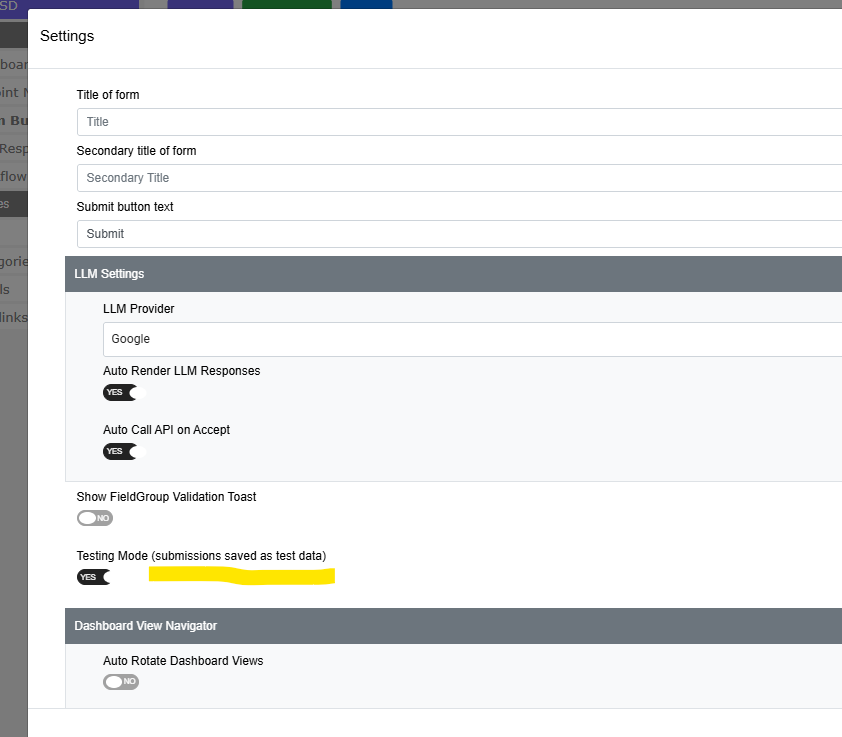
Whakatuwheratia te puka ki te kaihanga puka, whakatuwheratia te paewhiri Tautuhinga, ka kimihia te Aratau Whakamātau (ka tiakina ngā tuku hei raraunga whakamātau). Tautuhia ki ĀE.
Pikitia o te akoranga

Ka kitea tēnei i te haurua whakararo o te rārangi Tautuhinga, i raro tonu i te Whakaatu Pahūake Manatoko FieldGroup, ā, i runga ake i te wāhanga Kaiwhakatere Tirohanga Papatohu.

Ka noho hina tonu te pātene Tautuhinga kia kotahi te āpure kei roto i te puka. Ki te kore e taea e koe te pāwhiri i te Tautuhinga, tāpirihia he āpure ki te puka i te tuatahi.

Ka kitea te whakakā ki ngā puka anake. Kua hunahia i runga i te whakaaro ki te kaihanga papatohu, nā te mea kāore he mea o te papatohu hei whakarite ki te aratau whakamātau.

NGĀ MEA KA KITEA E TE TANGATA E WHAKAKĪ ANA I TE PUKA

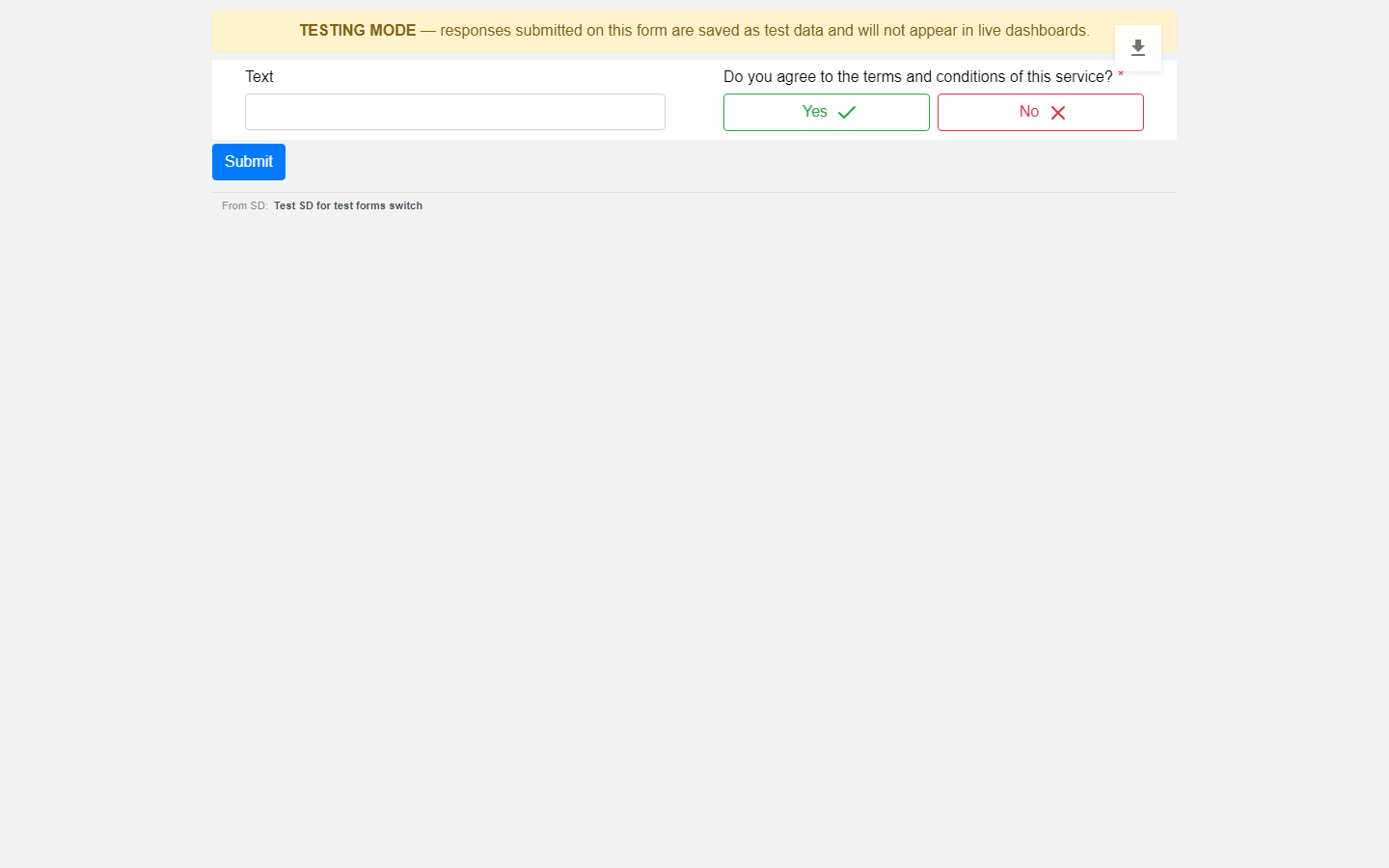
He kara kōwhai kei runga rawa i te puka: ARATAU WHAKAMĀTAU - ka tiakina ngā whakautu ka tukuna mā tēnei puka hei raraunga whakamātau, ā, kāore e puta ki ngā papatohu ora.
Pikitia o te akoranga

Me mārama rawa te kite. Kaua rawa tētahi e whakakī i te puka me te whakaaro ka whai pānga āna whakautu, i te mea kāore e whai pānga. Tautuhia anō te puka ki te Ora, ā, ka kore noa iho te kara e kitea.

KA AHA KI NGĀ RARAUNGA

Ka tohua ia tāpaetanga hei tāpaetanga whakamātau, hei tāpaetanga tūturu rānei i te wā tonu ka tukuna. Ka whakatauria tēnei mā te pānui i te tautuhinga ake o te puka i te tūmau, kaua mā ngā mea ka tukuna mai e te pūtirotiro. Nō reira, e kore e taea te rūpahu, te whakarerekē rānei e te tangata e whakakī ana i te puka.

Ka puritia ngā urupare whakamātau; kāore e whiua atu. Ka wātea tonu hei tirotiro ā muri ake.

TE WĀHI KA HAERE NGĀ RARAUNGA WHAKAMĀTAU, ME TE WĀHI KĀORE E HAERE

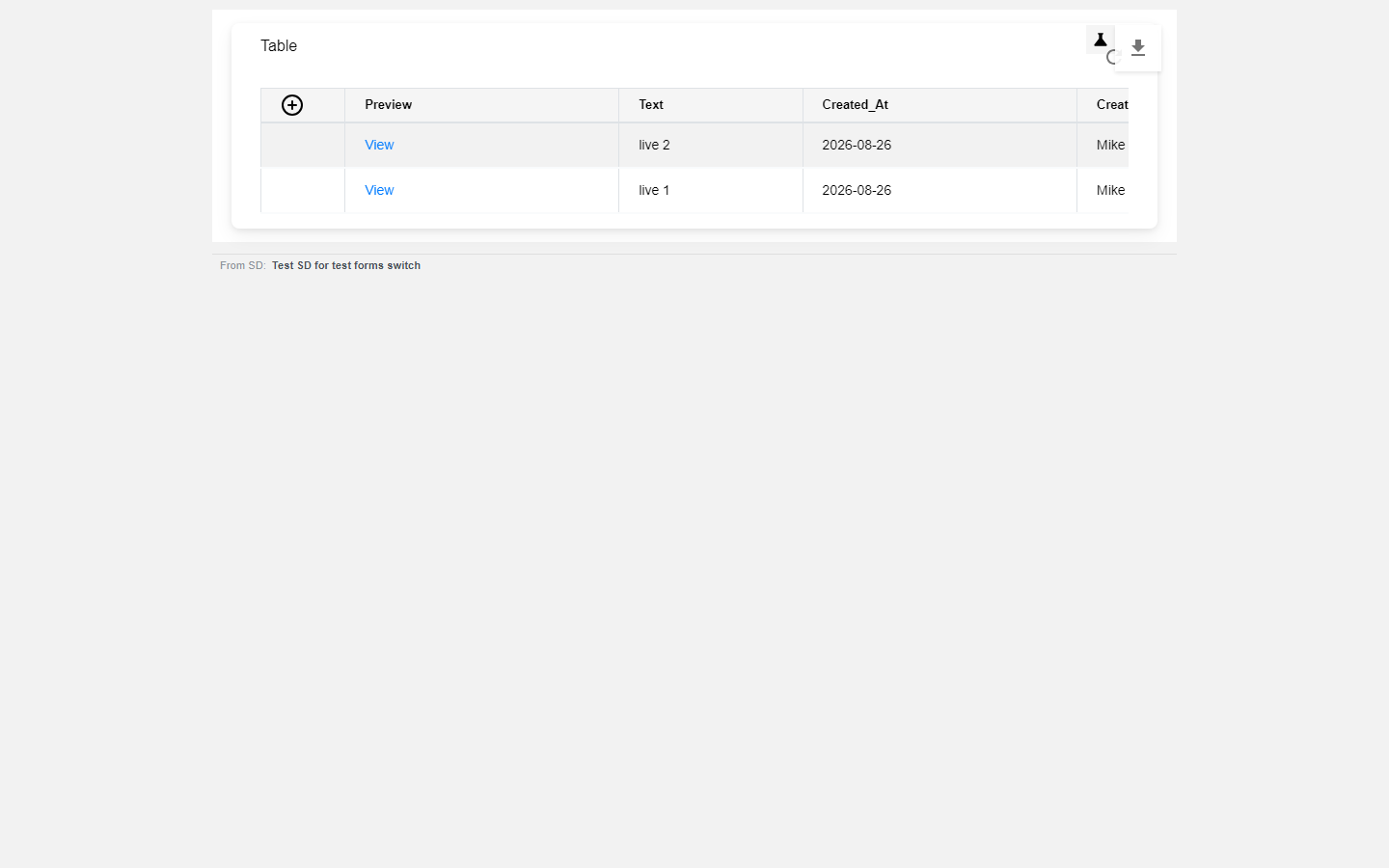
Mā te taunoa, ka whakaatu te papatohu i ngā urupare tūturu anake. Ka pā tēnei ki ngā tau me ngā rārangi hoki — kāore ngā tapeke, te maha o ngā pūkete me te whakaurunga whārangi e whai whakaaro ki ngā urupare whakamātau. E kore e taea e tētahi whakakī whakamātau te whakapiki huna i tētahi tatauranga, i tētahi kauwhata rānei.
Whakaahuamata akoranga

TE TIROTIRO I Ō RARAUNGA WHAKAMĀTAU

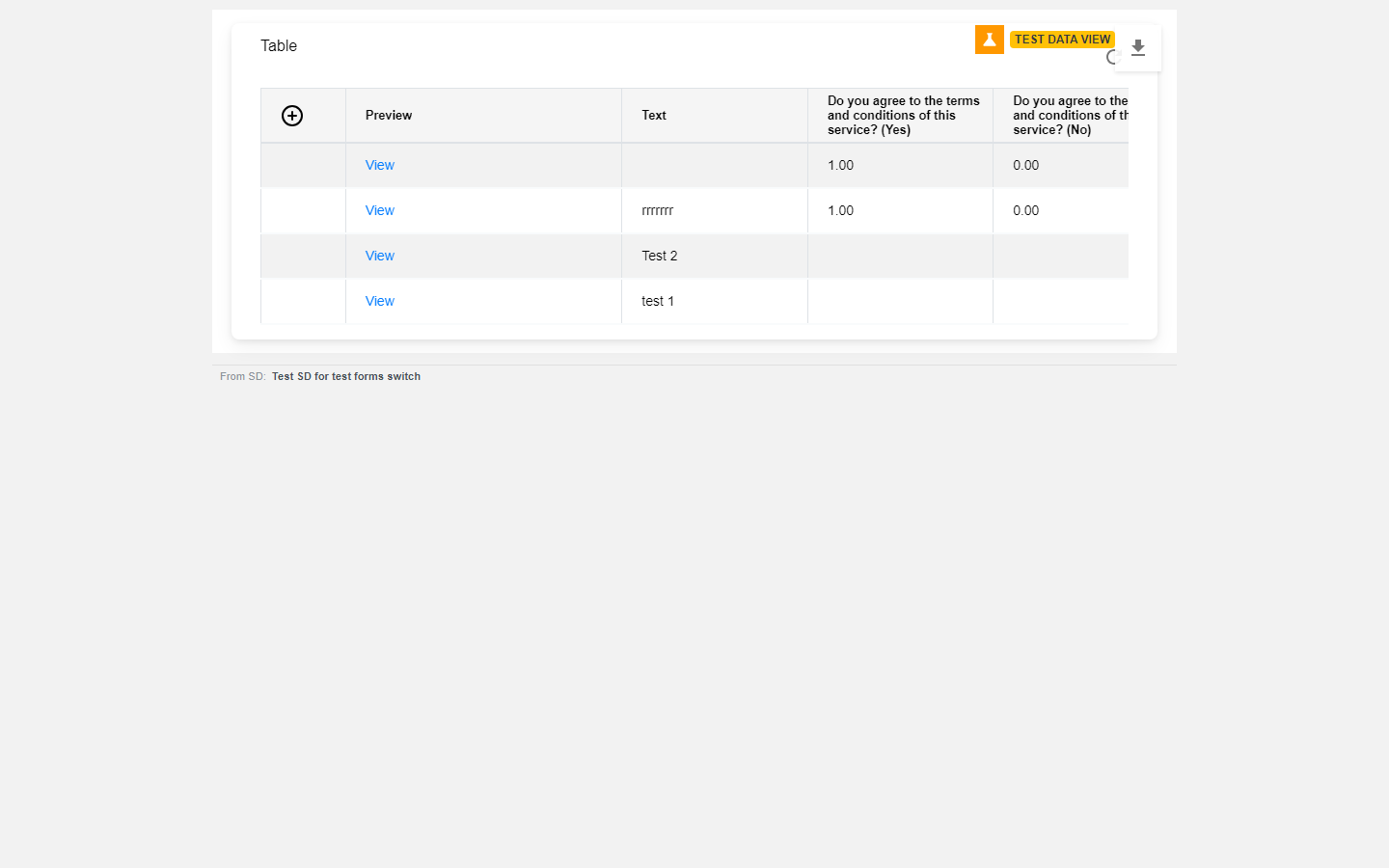
Pāwhiritia te ata ipu whakamātau kei te kokonga matau o runga o te papatohu. Ka huri te whakaaturanga kia kitea ko ngā urupare whakamātau anake, ā, ka puta he tohu karaka, TEST DATA VIEW, kia kore ai koe e wareware ko tēhea tirohanga e whakamahia ana. Pāwhiritia anō kia hoki ki ngā urupare tūturu.
Whakaahuamata akoranga

Mō ia tangata takitahi tēnei — ka whakarerekē te whakakā i tāu e kite ai, kaua i tā tētahi atu. Mō ia papatohu takitahi hoki — ki te whakakāngia mō tētahi papatohu, kāore e huri ngā papatohu katoa ki te aratau whakamātau.

KO WAI KA ĀHEI KI TE KITE I NGĀ RARAUNGA WHAKAMĀTAU

Ko ngā tāngata anake he mema nō te SD nōna te papatohu. Ka kite tonu te tangata e whakatuwhera ana i te papatohu mā tētahi hononga tiritahi i ngā raraunga tūturu, ā, kāore rawa ia e kite i te ata ipu whakamātau.

TE HOKI KI NGĀ RARAUNGA TŪTURU

Whakawetohia te whakakā Aratau Whakamātau. Mai i taua wā, ka tohua ngā tāpaetanga hou hei tāpaetanga tūturu. Ka noho tonu ngā urupare whakamātau o mua hei urupare whakamātau — kāore e hurihia, nō reira me muku mēnā e hiahia ana koe kia kore atu. Kāore he wā tatari; ā te wā ka tiki anō te papatohu i ngā raraunga, ka kitea te panonitanga.

NGĀ HERENGA ME MŌHIO

Ka waihanga tonu ngā whakakī whakamātau i ngā tūmahi tūturu. Ka tātarihia ngā papatohu whakautu puka. Mēnā he widget tāu e tatau ana i ngā SDs me ngā tikiti kua waihangatia rānei, ka tatau tonu i ngā whakakī whakamātau ki reira. He whakatau āta whai whakaaro tēnei mō te whānuitanga o te mahi, ehara i te hapa.

Ko ngā mea katoa i tukuna i mua i te wā i puta mai ai tēnei āhuahira, ka kiia he raraunga hohe. Kāore he tohu i aua rārangi, nō reira ka whakaarohia he raraunga tūturu.

Ka whakaatu te tirohanga whakamātau i ngā raraunga whakamātau anake — kāore e whakaaturia ngātahitia ngā raraunga whakamātau me ngā raraunga hohe.

Check yourself

Checking your PaT sign-in…

O muaWaihangaia he TūmahiO muri Build a reporting system

Kei tēnei whārangi

  • HE AHA TE TAKE
  • WHAKAKĀHIA
  • NGĀ MEA KA KITEA E TE TANGATA E WHAKAKĪ ANA I TE PUKA
  • KA AHA KI NGĀ RARAUNGA
  • TE WĀHI KA HAERE NGĀ RARAUNGA WHAKAMĀTAU, ME TE WĀHI KĀORE E HAERE
  • TE TIROTIRO I Ō RARAUNGA WHAKAMĀTAU
  • KO WAI KA ĀHEI KI TE KITE I NGĀ RARAUNGA WHAKAMĀTAU
  • TE HOKI KI NGĀ RARAUNGA TŪTURU
  • NGĀ HERENGA ME MŌHIO
PPaT Wiki

He tuhinga, he pātengi raraunga mātauranga, he tautoko ā-hapori hoki mō People and Tasks.

Tuhinga

  • Te tīmatanga
  • Ngā ariā matua
  • Ngā tuituitanga
  • Tohutoro API

Tautoko

  • Pātengi raraunga mātauranga
  • Huinga ā-hapori
  • Whakapā mai
  • Tūnga ratonga

Kamupene

  • PaT
  • Tuhinga rangitaki
  • Ngā Ture
  • Tūmataitinga

© People and Tasks. Kua rāhuitia ngā motika katoa.