PPaT Wiki
DocumentationPathwayKnowledge baseForumBlogContact
Week streakFOUNDATION0 badges
Language: English
  • English
  • Nederlands
  • Karen (S'gaw)
  • Français
  • Deutsch
  • Lea faka-Tonga
  • Te reo Māori
Ask the community

Your PaT Pathway

0/46
Foundation
0/43
Practitioner
0/37
Advanced
0/20
Super User

Advanced

  • ●Form Test Mode (this page)
  • ○Pure Forms (not passed yet)
  • ○Conditional Formatting (not passed yet)
  • ○How to upload form elements to an SD (not passed yet)
  • ○Forms - Extract Data (the AI form builder) (not passed yet)
  • ○How to make form templates live for everyone to use (not passed yet)
  • ○Form builder: field types (not passed yet)
  • ○SD Forms (not passed yet)
  • ○Build a reporting system (not passed yet)
  • ○Endpoint Manager: finding endpoints and building your own UDF (not passed yet)
  • ○Configuring a UDF: columns and calculated columns (not passed yet)
  • ○Configuring a UDF: filters, grouping and endpoint details (not passed yet)
  • ○SD Dashboard: building a dashboard (not passed yet)
  • ○PaT SD Map Presentation (not passed yet)
  • ○PaT SD Map Overview (not passed yet)
  • ○Strategy System (not passed yet)
  • ○PaT SD Templates Overview (not passed yet)
  • ○How to use the PAR SD (not passed yet)
  • ○SD Security Settings (not passed yet)
  • ○SD Template Helper Functions (not passed yet)
  • ○Mastering the Business Strategy Template (not passed yet)
  • ○Using SDs as the LMS Document (not passed yet)
  • ○How to embed an SD into the LMS (not passed yet)
  • ○How to build modules in the Module publisher (not passed yet)
  • ○Module Publisher Content Options (not passed yet)
  • ○How to create module quizzes (not passed yet)
  • ○How to create module comprehension audits (not passed yet)
  • ○Module Completion Notification Setup (not passed yet)
  • ○Customer-specific training: setting it up (not passed yet)
  • ○How to create module evidential audits (not passed yet)
  • ○Module Admin: finding and managing modules (not passed yet)
  • ○Auto Escalation (not passed yet)
  • ○How managers can turn on OOF for their staff (not passed yet)
  • ○Using Chat to SD to go from being a good manager to a great one (not passed yet)
  • ○Throttling (not passed yet)
  • ○Live H&S Reporting (not passed yet)
  • ○Chat Management - Pro Tips (not passed yet)
  • Company Structure: adding a new user
  • Company Structure: customer companies
  • Company Structure: departments, job titles and roles
  • Company Structure: modules for a site or a country
  • Company Structure: process categories
  • Connections: linking PaT to Microsoft 365
  • Forms - API Integration
  • How to create a campaign for the PaT Lite training portal
  • How to edit an existing Bulletin Board Post
  • How to set up your SD Map
  • LMS Feedback: learner ratings and comments
  • LMS Metrics - If you can't measure it, you can't manage it
  • Manage users
  • Pacing recertifications and escalations
  • PaT Business Unit Template Overview
  • SD Workflows - Multi Submit
  • SD Workflows - Workflow Settings
  • System Activity: escalations, logins, emails and more
  • System Config: company settings
  • The org chart
  • Add any Image as a Section Header Icon
  • Assigning an SD to a new parent
  • C2E Attachments
  • Chat reminder
  • Chat to email to chat
  • Chat to SD
  • Chat to task to project
  • Comprehension Audits
  • Customer-specific training: how it works
  • Different Form Uses
  • Docked Chats
  • Docking SDs and Updating Images
  • Email to BFF
  • Email to chat to email – non PaT users
  • Embedding live data in an SD (graphs and spreadsheets)
  • Embedding SDs in SDs
  • Evidential audits: completing one
  • Filing and retrieving SDs
  • Form Wall
  • Health and safety templates
  • How PaT Manages Inactive Users
  • How SD chats work with SD Members and External Users
  • How to unlock a module for a staff member
  • Info Icons
  • Inline chats
  • Invite Attendees
  • LMS Architecture
  • Moving Section Headers
  • Multi-Tasks
  • PaT AI
  • Pop-Out Chat Feature
  • Recurring tasks: create and edit
  • Running Meetings with SDs
  • Safe Walks
  • SD Element Categorisation
  • SD Form Responses: finding and exporting form responses
  • SD Owner Functions
  • SD Task wall view
  • Share and record your screen
  • Task Integrity: what it is and why it drops
  • Track Engagement
  • Using SDs as a report or meeting minutes app
  • Video rooms: guests joining and asking to record
  • Activity Notifications
  • Add members and set permissions
  • AI Summary: a quick summary of an SD
  • Capture and Manage Accidents
  • Capture and Manage Hazards
  • Chat to task
  • Chat Wall
  • Contextual Communication
  • Convert a Note to a Task
  • Create a new SD
  • Create a Task
  • Critical Chrome Extensions
  • Document Store: shared links, your folders and favourites
  • Fast Notes
  • Getting help: the PaT Helpdesk
  • Global Search
  • Group Chats
  • How to embed Outlook onto your PaT
  • How to resize your browser to best view PaT
  • How to use the PaT Lite training portal
  • Insert links
  • Module Learning - Desktop
  • Module Learning - Mobile
  • My Profile
  • Newbie PaT Intro – Chats and SDs
  • Notes
  • Out Of Office: turning it on, and the calendar on your Task Wall
  • Outlook 2FA Issue
  • PaT Chat Overview
  • PaT Mobile App – Overview
  • Preview, download and share files
  • Publish a Bulletin Board Post
  • Reading an SD in another language
  • SD Elements
  • SD Main page useful features
  • SD Overview
  • Section Headers
  • Security measures for multiple users on a device
  • Share Feedback
  • Signing in to PaT and resetting your password
  • Task Management
  • Task Management System
  • Task Wall
  • Traffic light progress
  • Upload file attachments
  • Video calls on the mobile app
  • Auto Escalation
  • Build a reporting system
  • Chat Management - Pro Tips
  • Conditional Formatting
  • Configuring a UDF: columns and calculated columns
  • Configuring a UDF: filters, grouping and endpoint details
  • Customer-specific training: setting it up
  • Endpoint Manager: finding endpoints and building your own UDF
  • Form builder: field types
  • Form Test Mode
  • Forms - Extract Data (the AI form builder)
  • How managers can turn on OOF for their staff
  • How to build modules in the Module publisher
  • How to create module comprehension audits
  • How to create module evidential audits
  • How to create module quizzes
  • How to embed an SD into the LMS
  • How to make form templates live for everyone to use
  • How to upload form elements to an SD
  • How to use the PAR SD
  • Live H&S Reporting
  • Mastering the Business Strategy Template
  • Module Admin: finding and managing modules
  • Module Completion Notification Setup
  • Module Publisher Content Options
  • PaT SD Map Overview
  • PaT SD Map Presentation
  • PaT SD Templates Overview
  • Pure Forms
  • SD Dashboard: building a dashboard
  • SD Forms
  • SD Security Settings
  • SD Template Helper Functions
  • Strategy System
  • Throttling
  • Using Chat to SD to go from being a good manager to a great one
  • Using SDs as the LMS Document
  • PaT Lite: Key aspects of PaT you need to understand
  • What is PaT and why it matters
  • PaT Lite: Chat to Task
  • PaT Lite: Introducing Strategy Documents
  • PaT Lite: Core Philosophy - Standards and Tactical Execution
  • PaT Lite: Intelligent tools that think with you
  • PaT Lite: The Future of business is Culture
  • Welcome to the PaT wiki
  • Setting up your workspace
  • Your first week
  • Strategy Documents
  • Tasks and assignments
  • Permissions model
  • Chat and discussion
  • Forms and submissions
  • Dashboards and reporting
  • Managing users
  • Workspace settings
  • Connecting an accounting system
  • Single sign-on
  • API overview
  • Access tokens
  • Webhooks
0/46
Foundation
0/43
Practitioner
0/37
Advanced
0/20
Super User
Advanced quizzes: 0 of 37 passed
  • ●Form Test Mode (this page)
  • ○Pure Forms (not passed yet)
  • ○Conditional Formatting (not passed yet)
  • ○How to upload form elements to an SD (not passed yet)
  • ○Forms - Extract Data (the AI form builder) (not passed yet)
  • ○How to make form templates live for everyone to use (not passed yet)
  • ○Form builder: field types (not passed yet)
  • ○SD Forms (not passed yet)
  • ○Build a reporting system (not passed yet)
  • ○Endpoint Manager: finding endpoints and building your own UDF (not passed yet)
  • ○Configuring a UDF: columns and calculated columns (not passed yet)
  • ○Configuring a UDF: filters, grouping and endpoint details (not passed yet)
  • ○SD Dashboard: building a dashboard (not passed yet)
  • ○PaT SD Map Presentation (not passed yet)
  • ○PaT SD Map Overview (not passed yet)
  • ○Strategy System (not passed yet)
  • ○PaT SD Templates Overview (not passed yet)
  • ○How to use the PAR SD (not passed yet)
  • ○SD Security Settings (not passed yet)
  • ○SD Template Helper Functions (not passed yet)
  • ○Mastering the Business Strategy Template (not passed yet)
  • ○Using SDs as the LMS Document (not passed yet)
  • ○How to embed an SD into the LMS (not passed yet)
  • ○How to build modules in the Module publisher (not passed yet)
  • ○Module Publisher Content Options (not passed yet)
  • ○How to create module quizzes (not passed yet)
  • ○How to create module comprehension audits (not passed yet)
  • ○Module Completion Notification Setup (not passed yet)
  • ○Customer-specific training: setting it up (not passed yet)
  • ○How to create module evidential audits (not passed yet)
  • ○Module Admin: finding and managing modules (not passed yet)
  • ○Auto Escalation (not passed yet)
  • ○How managers can turn on OOF for their staff (not passed yet)
  • ○Using Chat to SD to go from being a good manager to a great one (not passed yet)
  • ○Throttling (not passed yet)
  • ○Live H&S Reporting (not passed yet)
  • ○Chat Management - Pro Tips (not passed yet)
  1. Documentation
  2. Advanced
  3. Form Test Mode

Form Test Mode

Until now, testing a form meant your practice entries landed in the same place as the real ones. You either avoided testing on a form people actually use, or you filled it in and then went hunting…

On this page
  • WHAT THIS IS FOR
  • TURNING IT ON
  • WHAT THE PERSON FILLING IN THE FORM SEES
  • WHAT HAPPENS TO THE DATA
  • WHERE TEST DATA GOES, AND DOES NOT GO
  • LOOKING AT YOUR TEST DATA
  • WHO IS ALLOWED TO SEE TEST DATA
  • SWITCHING BACK TO LIVE
  • LIMITS WORTH KNOWING

WHAT THIS IS FOR

Until now, testing a form meant your practice entries landed in the same place as the real ones. You either avoided testing on a form people actually use, or you filled it in and then went hunting for the rows to delete afterwards.

Test Mode lets you put a form into a testing state, fill it in as often as you like, check the results came out right, and know that none of it reaches your live dashboards. When you are done, you switch it back.

TURNING IT ON

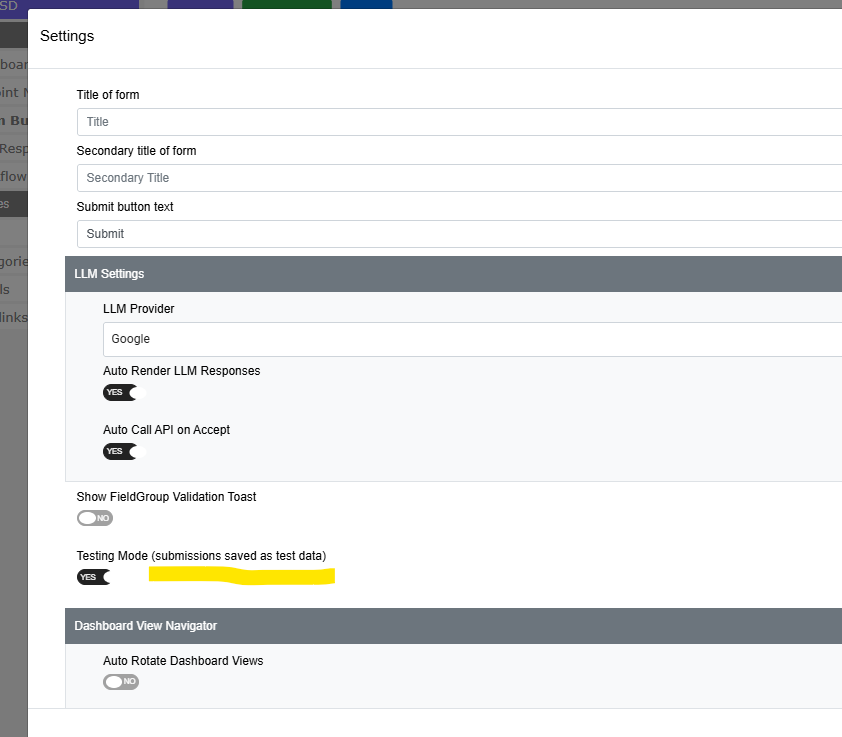
Open the form in the form builder, open the Settings panel, and find Testing Mode (submissions saved as test data). Set it to YES.
Lesson screenshot

You will find it in the lower half of the Settings list, just under Show FieldGroup Validation Toast and above the Dashboard View Navigator section.

The Settings button stays greyed out until the form has at least one field on it. If you cannot click Settings, add a field to the form first.

The switch appears on forms only. It is deliberately hidden in the dashboard builder, because a dashboard has nothing to put into test mode.

WHAT THE PERSON FILLING IN THE FORM SEES

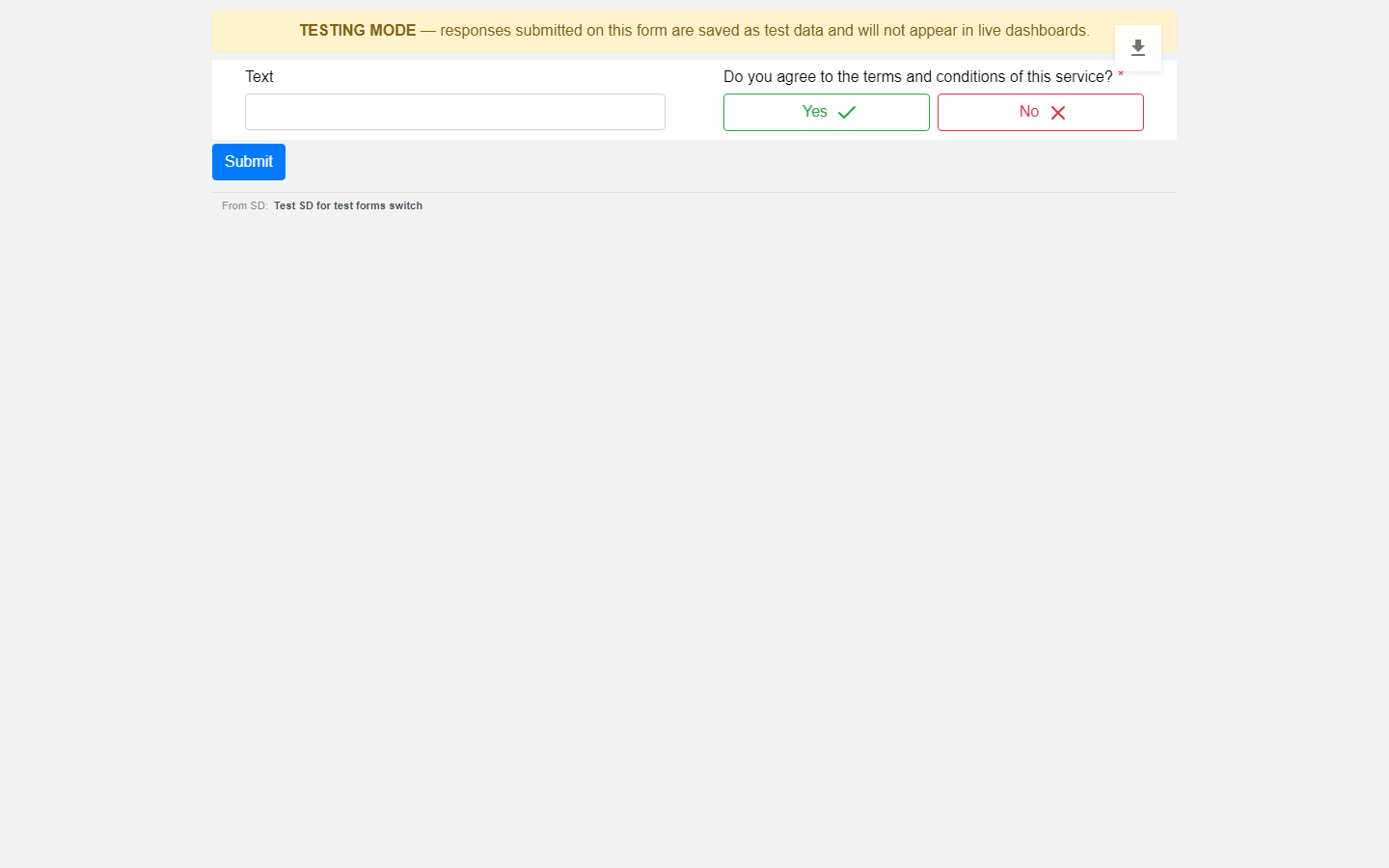
A yellow banner across the top of the form: TESTING MODE - responses submitted on this form are saved as test data and will not appear in live dashboards.
Lesson screenshot

It is meant to be impossible to miss. Nobody should fill in a form believing it counts when it does not. Set the form back to Live and the banner is simply not there.

WHAT HAPPENS TO THE DATA

Every submission is marked test or live at the moment it is submitted. The mark is decided by reading the form's own setting on the server, not by anything the browser sends - so it cannot be faked, and it cannot be changed by the person filling in the form.

Test responses are stored, not thrown away. They are still there to look at afterwards.

WHERE TEST DATA GOES, AND DOES NOT GO

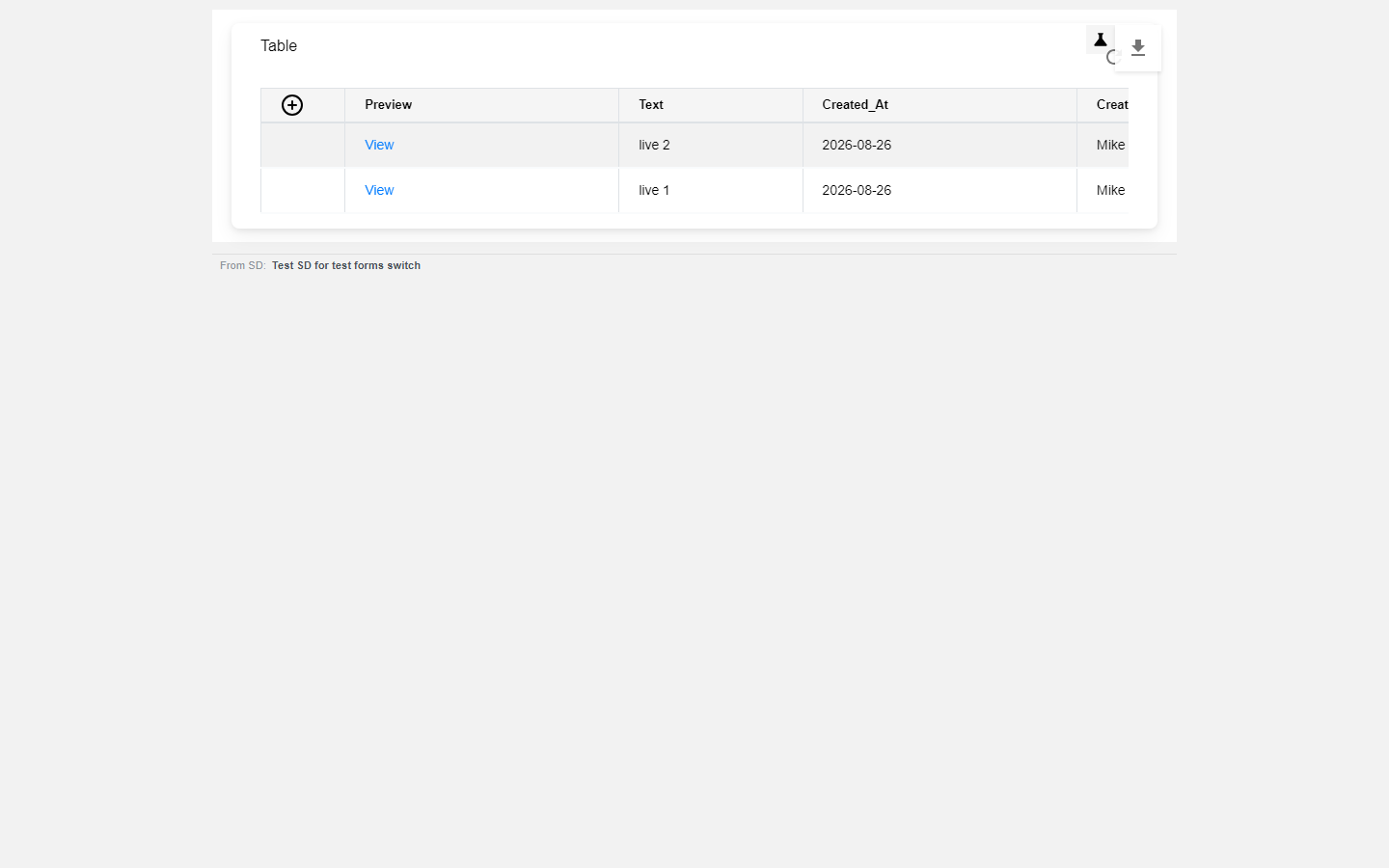
By default a dashboard shows live responses only. This covers the numbers as well as the rows - totals, record counts and paging all ignore test responses. A test fill cannot quietly inflate a count or a chart.
Lesson screenshot

LOOKING AT YOUR TEST DATA

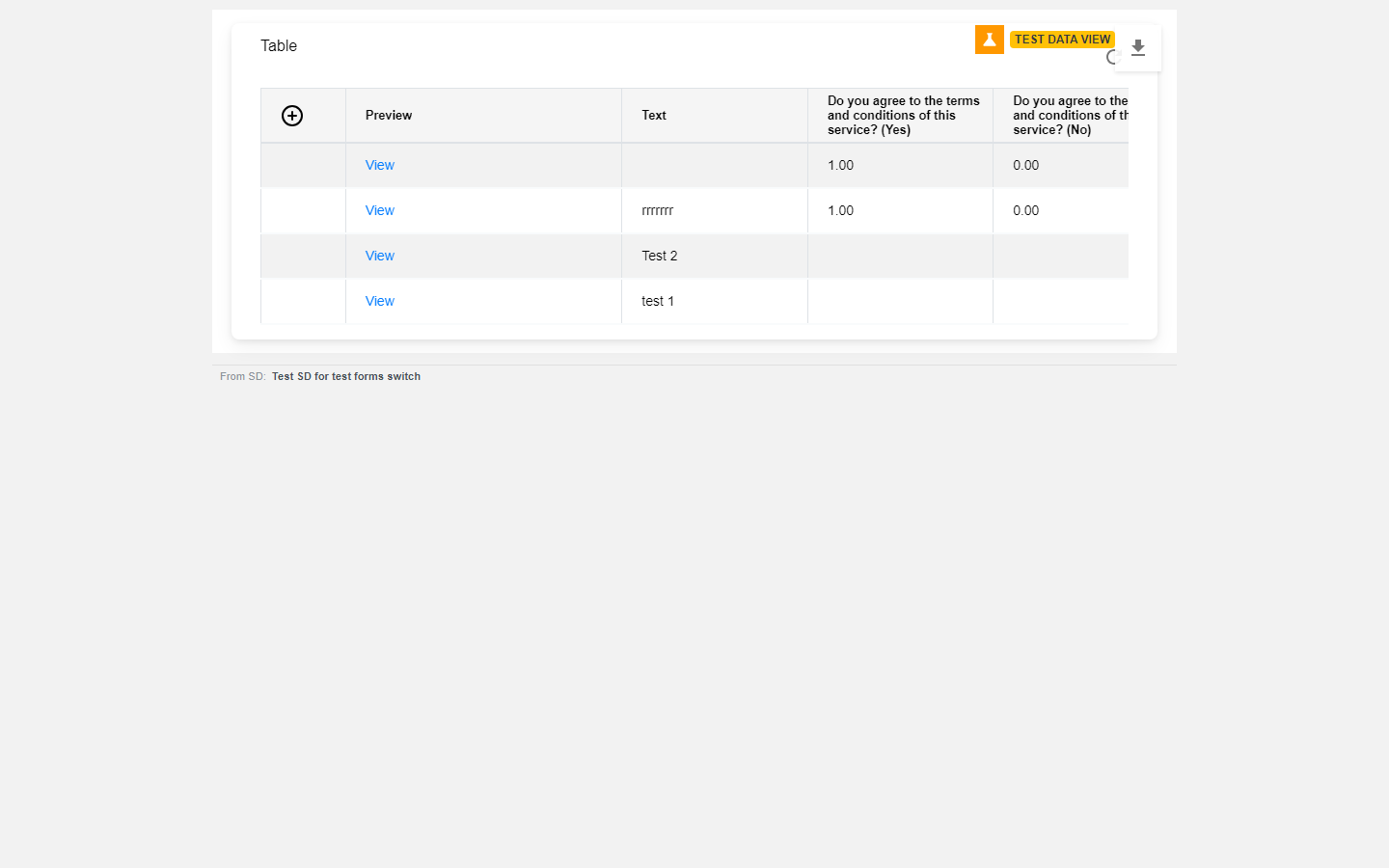
Click the flask icon in the top right of the dashboard. It switches to showing only the test responses, with an orange TEST DATA VIEW badge so you cannot forget which view you are in. Click it again to go back to live.
Lesson screenshot

It is per person - turning it on changes what you see, not what anyone else sees. And it is per dashboard - switching it on for one does not put every other dashboard into test mode.

WHO IS ALLOWED TO SEE TEST DATA

Only people who are members of the SD that the dashboard belongs to. Anyone opening the dashboard through a shared link always sees live data, and never gets the flask icon at all.

SWITCHING BACK TO LIVE

Turn the Testing Mode switch off. New submissions are stamped live from that moment on. Existing test responses stay test responses - they do not convert, so if you want them gone they have to be deleted. There is no waiting period; the next time the dashboard fetches, it reflects the change.

LIMITS WORTH KNOWING

Test fills still create real tasks. The filtering covers form-response dashboards. If you have a widget that counts SDs or tickets created, test fills will still be counted there. That was a deliberate scope decision, not an oversight.

Anything submitted before this feature existed counts as live. There was no mark on those rows, so they are treated as real data.

The test view shows test data only - not test and live side by side.

Check yourself

Checking your PaT sign-in…

PreviousForm builder: field typesNext Forms - Extract Data (the AI form builder)

On this page

  • WHAT THIS IS FOR
  • TURNING IT ON
  • WHAT THE PERSON FILLING IN THE FORM SEES
  • WHAT HAPPENS TO THE DATA
  • WHERE TEST DATA GOES, AND DOES NOT GO
  • LOOKING AT YOUR TEST DATA
  • WHO IS ALLOWED TO SEE TEST DATA
  • SWITCHING BACK TO LIVE
  • LIMITS WORTH KNOWING
PPaT Wiki

Documentation, knowledge base and community support for People and Tasks.

Documentation

  • Getting started
  • Core concepts
  • Integrations
  • API reference

Support

  • Knowledge base
  • Community forum
  • Contact us
  • Service status

Company

  • PaT
  • Blog
  • Terms
  • Privacy

© People and Tasks. All rights reserved.